Operational Tool — SaaS B2B (Fintech)

Payment Operations Console

Payment Operations Console

A system designed to help operations teams manage failed payments, take action, and track outcomes.

A system designed to help operations teams manage failed payments, take action, and track outcomes.

Role: Product Designer

Type: Concept project

Year: 2026

Overview

Overview

Payment Operations Console is a SaaS tool designed for payments operations teams to manage problematic transactions.

It helps users move from identifying issues to taking action and tracking results in a structured way.

Problem

Problem

When payments fail, teams need to:

  • understand what happened

  • decide what to do

  • take action quickly

  • track the outcome

In many tools, this process is fragmented.

Data is available, but:

  • there is no clear prioritization

  • actions are not guided

  • next steps are unclear

This leads to slower resolution and potential revenue loss.

Product Approach

Product Approach

Instead of designing a dashboard, I designed an operational decision system.


The product supports a clear workflow:

Detect

Detect

Investigate

Investigate

Decide

Decide

Resolve

Resolve

Track

Track

The goal is to reduce uncertainty and guide users toward the next action.

Core Structure

Core Structure

The system is built around three main elements:

  • Issues Queue

  • Investigation Panel

  • Case Detail

Prototype

Prototype

A short prototype shows how users move from issue detection to action and outcome.

Deep Dive

Deep Dive

Issues Queue — Prioritization First

Issues Queue — Prioritization First

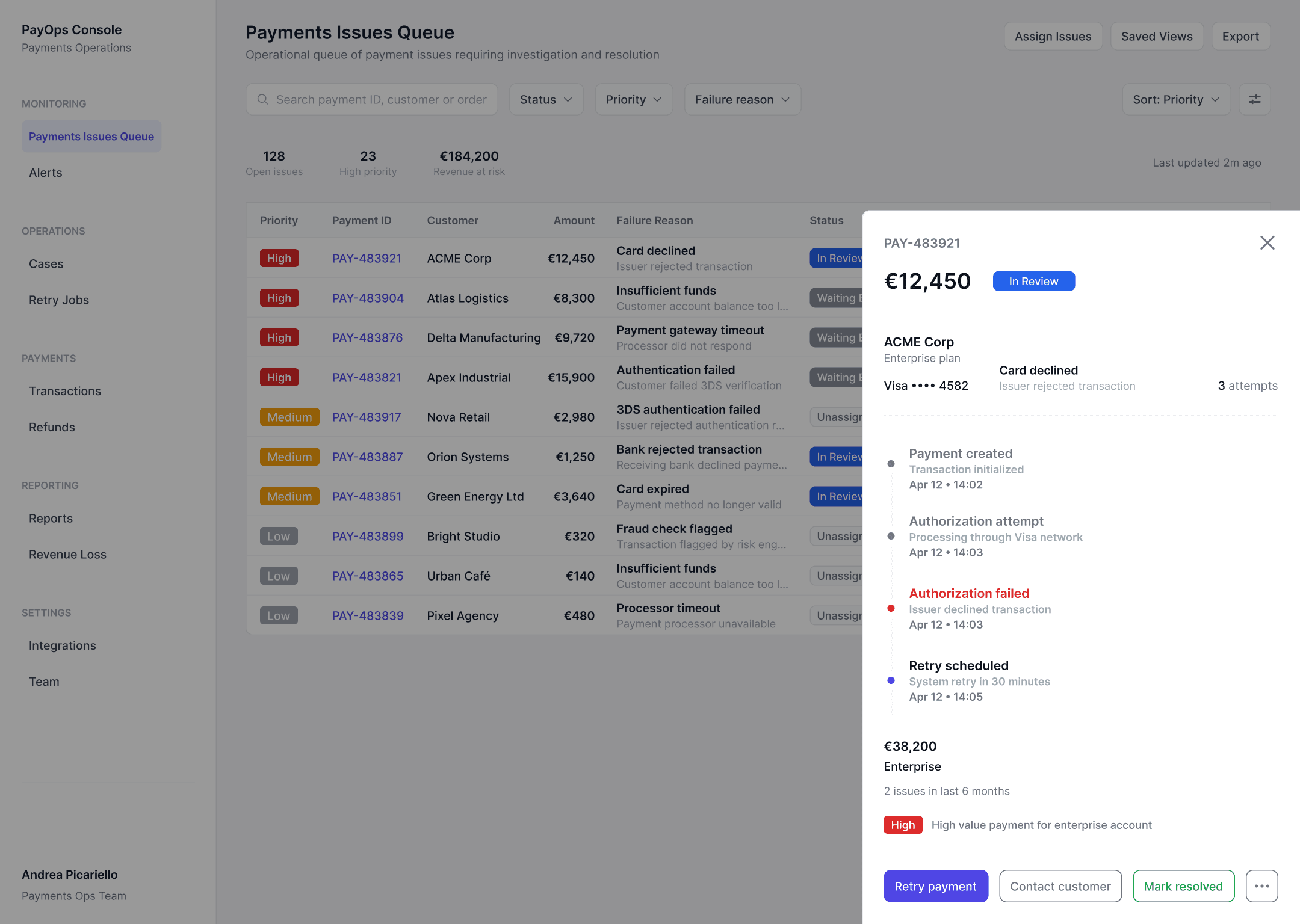
The queue is the main working environment.

It is designed to answer:
What should I handle first?

Each row includes:

  • priority

  • failure reason

  • number of attempts

  • status

  • assignee

A summary at the top shows:

  • total issues

  • high priority cases

  • revenue at risk

This helps teams quickly understand impact and focus.
Investigation Panel — Fast Decisions

Investigation Panel — Fast Decisions

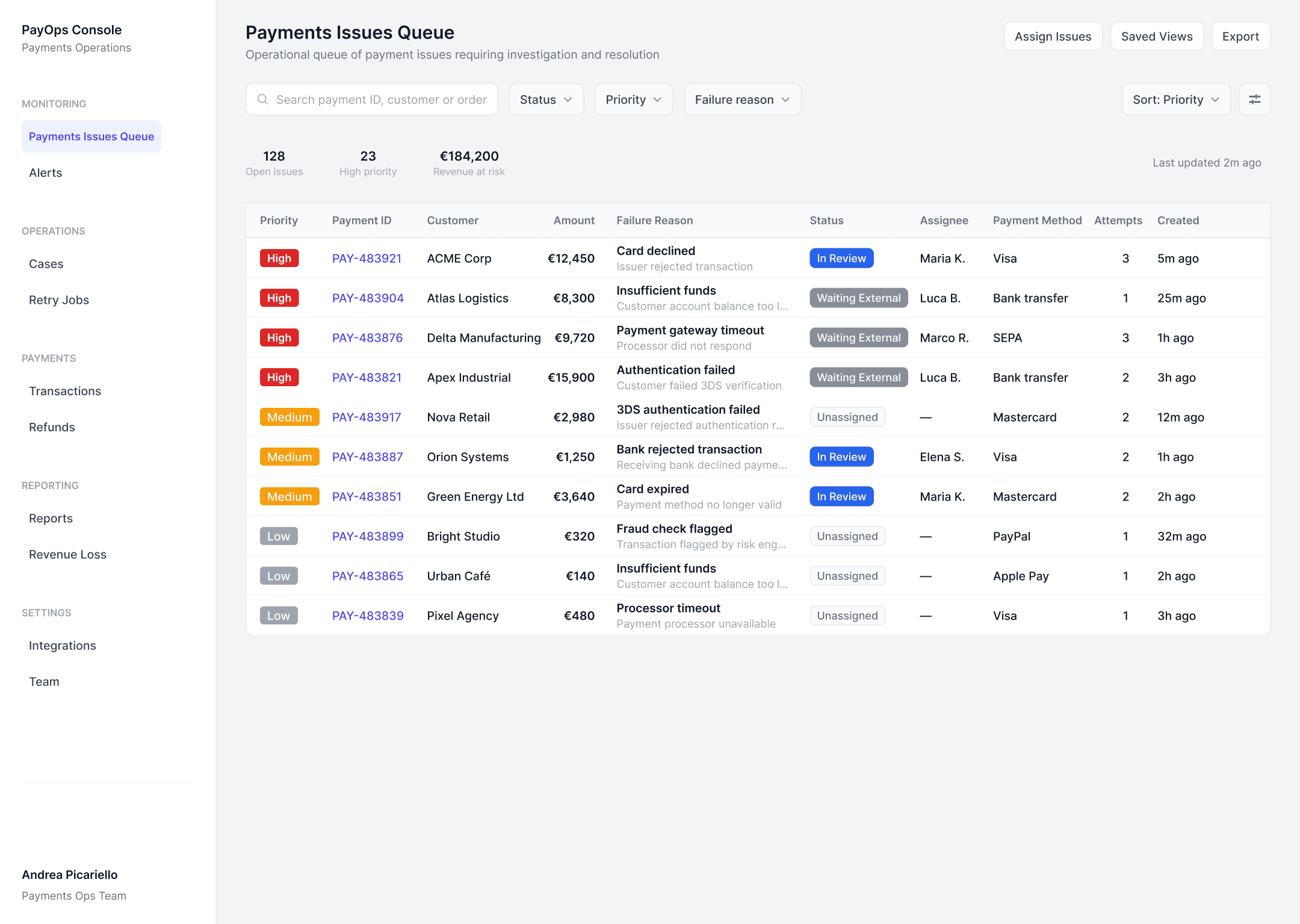
Clicking a row opens a panel on top of the queue.

This allows quick investigation without losing context.

The panel includes:

  • payment details

  • failure reason

  • attempts

  • customer context

  • timeline

The key element is the action layer.

Users can immediately:

  • retry payment

  • contact customer

  • mark as resolved

Advanced actions are grouped separately to reduce noise.

This creates a clear distinction between:

  • frequent actions

  • secondary actions

Case Detail — Structured Decision Making

Case Detail — Structured Decision Making

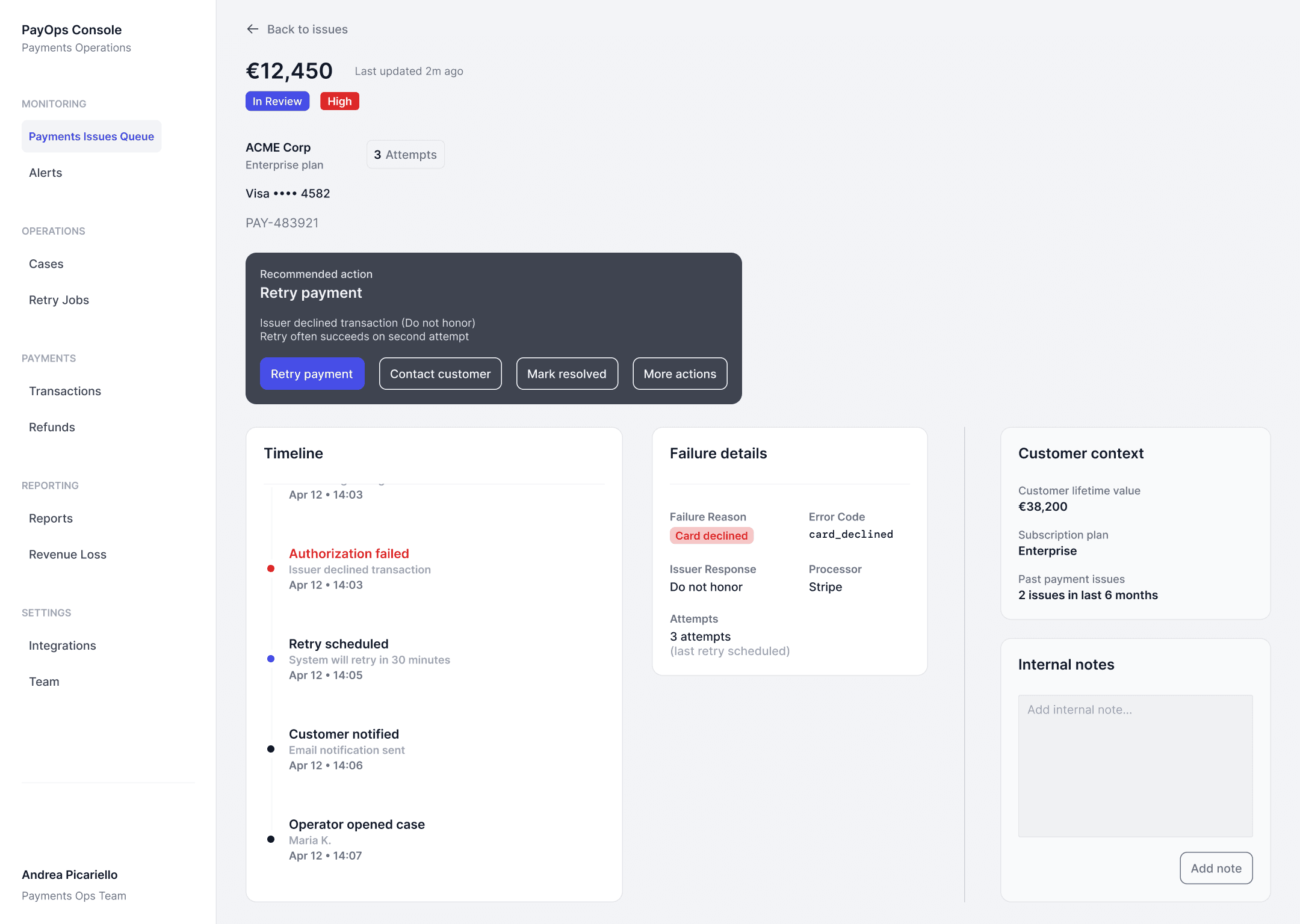
For more complex cases, users can open a full detail view.

This page focuses on one question:
What is the best action to take?
Action Panel — Guiding Decisions

Action Panel — Guiding Decisions

At the center of the page is the Action Panel.

It provides:

  • a recommended action

  • the reason behind it

  • available actions

This reduces uncertainty and speeds up decisions.

After an action is triggered, the system updates:

  • status

  • next step

At the center of the page is the Action Panel.

It provides:

  • a recommended action

  • the reason behind it

  • available actions

This reduces uncertainty and speeds up decisions.

After an action is triggered, the system updates:

  • status

  • next step

Timeline — Understanding the Case

Timeline — Understanding the Case

The timeline shows the sequence of events:

  • payment attempts

  • failures

  • retries

  • communication

Events are visually differentiated to highlight:

  • errors

  • active processes

  • completed steps

The timeline shows the sequence of events:

  • payment attempts

  • failures

  • retries

  • communication

Events are visually differentiated to highlight:

  • errors

  • active processes

  • completed steps

Failure Details — Technical Context

Failure Details — Technical Context

A structured block shows:

  • failure reason

  • error code

  • processor response

  • attempts

This supports deeper diagnosis.

A structured block shows:

  • failure reason

  • error code

  • processor response

  • attempts

This supports deeper diagnosis.

Customer Context

Customer Context

Additional information includes:

  • customer value

  • plan

  • past issues

This helps adapt decisions based on context.

Additional information includes:

  • customer value

  • plan

  • past issues

This helps adapt decisions based on context.

State System — From Action to Outcome

State System — From Action to Outcome

Each case follows a clear state model:

  • Unassigned

  • In Review

  • Waiting External

  • Retry Scheduled

  • Resolved

Actions directly update the state.

This creates a clear relationship between:

Action

State

Next step

Key Design Decisions

Key Design Decisions

From data to decisions

The system guides actions instead of only showing information.

From data to decisions

The system guides actions instead of only showing information.

Action Panel as core element

Decisions are centralized and supported with context.

Action Panel as core element

Decisions are centralized and supported with context.

Prioritization in the queue

Users can quickly identify high-impact issues.

Prioritization in the queue

Users can quickly identify high-impact issues.

Dual navigation model

Panel for speed, detail page for depth.

Dual navigation model

Panel for speed, detail page for depth.

Simplified action system

Primary actions are visible, secondary actions are grouped.

Simplified action system

Primary actions are visible, secondary actions are grouped.

Outcome

Outcome

This project demonstrates the ability to design:

  • operational SaaS tools

  • workflow-based interfaces

  • decision systems

It improves clarity by:

  • highlighting priorities

  • guiding actions

  • making outcomes visible

Learnings

Learnings

Operational tools require a different approach compared to dashboards.

The main challenge is not showing more data, but helping users understand what to do next.

Clear actions and state transitions are essential to support real workflows.

Andrea Picariello

Product / UX Designer

Andrea Picariello

Product / UX Designer

Andrea Picariello

Product / UX Designer